
Problem: Your Substack Is Invisible To Google. Let's Fix It In 10 Mins.
I've been hearing rumblings about poor SEO, and its true. Here's what to do.

(Even if you don’t have a Substack, read this! You need a framework for what your writing should do for you.)
I have heard rumblings about the poor SEO on Substack except for well subscribed publications, and lo and behold, it’s true.
I need to apologize for how I’ve encouraged you to start a Substack without understanding their walled-garden SEO.
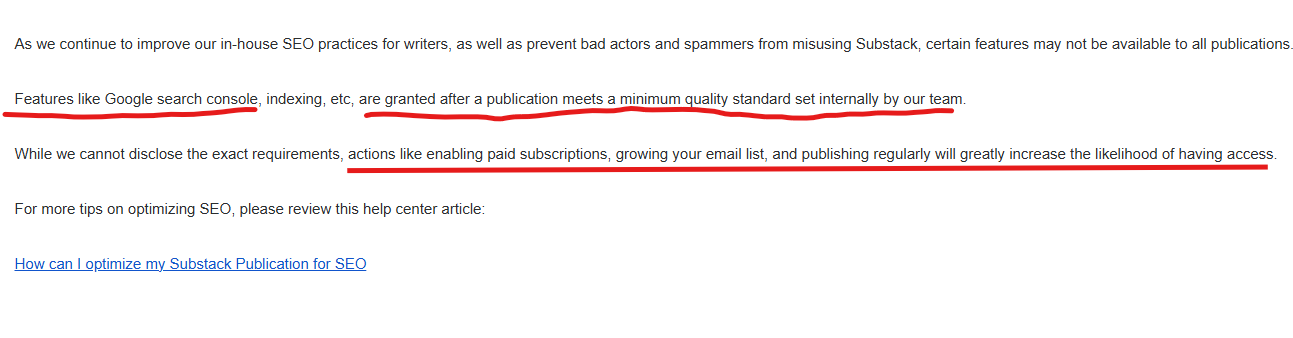
For a number of reasons - some having to do with avoiding fraudulent activity to brand strength - Substack will block Google from ranking your content for smaller publications.
In fact, if you don’t start with a list of subscribers a couple hundred strong, you are on your own. They won’t allow you access to the tools you need in your settings to improve your SEO.
Quick Note: Why a blog and being recognized by Google are important.
1 - You need a blog. Somewhere that can serve as a landing place for your insights.
This DOES NOT have to be Substack. It can be your website, Medium, or other one-stop-shop for people to go deep on your thinking, your ideas, your work. That one central home is what turns a curious stranger into someone who trusts you, learns from you, eventually hires you. A LinkedIn profile is a necessary start, but won’t suffice. I’m looking for 8 hours of insights. Podcast recordings, articles. (Yes, this is a goal I would like you to consider pursuing.)
2 - You need to keep up the habit of sharing your work. It is a muscle that atrophies SO FAST.
3 - Anyone in business for themselves, future or present, should have an actively growing list as part of their marketing plan.
Substack makes this easier than most platforms.
People can subscribe to your list easily.
When you write an article / blog, it is sent to people on your subscriber list. This does not happen when you have a website blog or Medium or other platforms. (This was the main selling point to Substack for me).
You’re in and around a group of writers who can refer you - you’re discoverable.
It puts you alongside other publishers, which means you can grow through referrals from other authors.
It’s a place your audience can find you, follow you, and keep coming back.
The problem is, Substack will not automatically give you good SEO. Which means that you’re content is not searchable.
Let’s fix this:
If Substack is where you build your brand, Google Search Console is where you measure your reach.
We have to make sure you are understood by Google and discovered for your content.
Login to your dashboard in Substack. Scroll down to the Settings, then go to Analytics almost at the bottom
If you don’t see Google search console form field on your Substack dashboard settings, you need to get more contacts onto your subscriber list. (see below for guidance.)
If you do have that field that we reference for Google site settings below, walk through this process. 15-minutes max and take these directions and feed them into Claude to go step by step or help troubleshoot.
How to Get your Substack into Google Search
Use these steps to prove ownership and ALSO - can tell Google exactly which post to prioritize. (note - these links are mine used as placeholder to show you where your links go - switch them out!)
1. Verify Site Ownership
Go to Google Search Console and hit Start or whatever the get started button is: https://search.google.com/search-console/about
In Google Search Console: Select Add Property > URL Prefix. Enter the link to your Substack.
Get the Code: Under “Other verification methods,” select HTML tag.
Copy the whole thing there, and leave this window open!
Go to your Substack: Go to your dashboard Settings > Analytics > Google Site Verification.
Paste the string and click Save.
Return to Search Console and click Verify.
2. Submit Your Sitemap
This gives Google a permanent “map” of your entire publication.
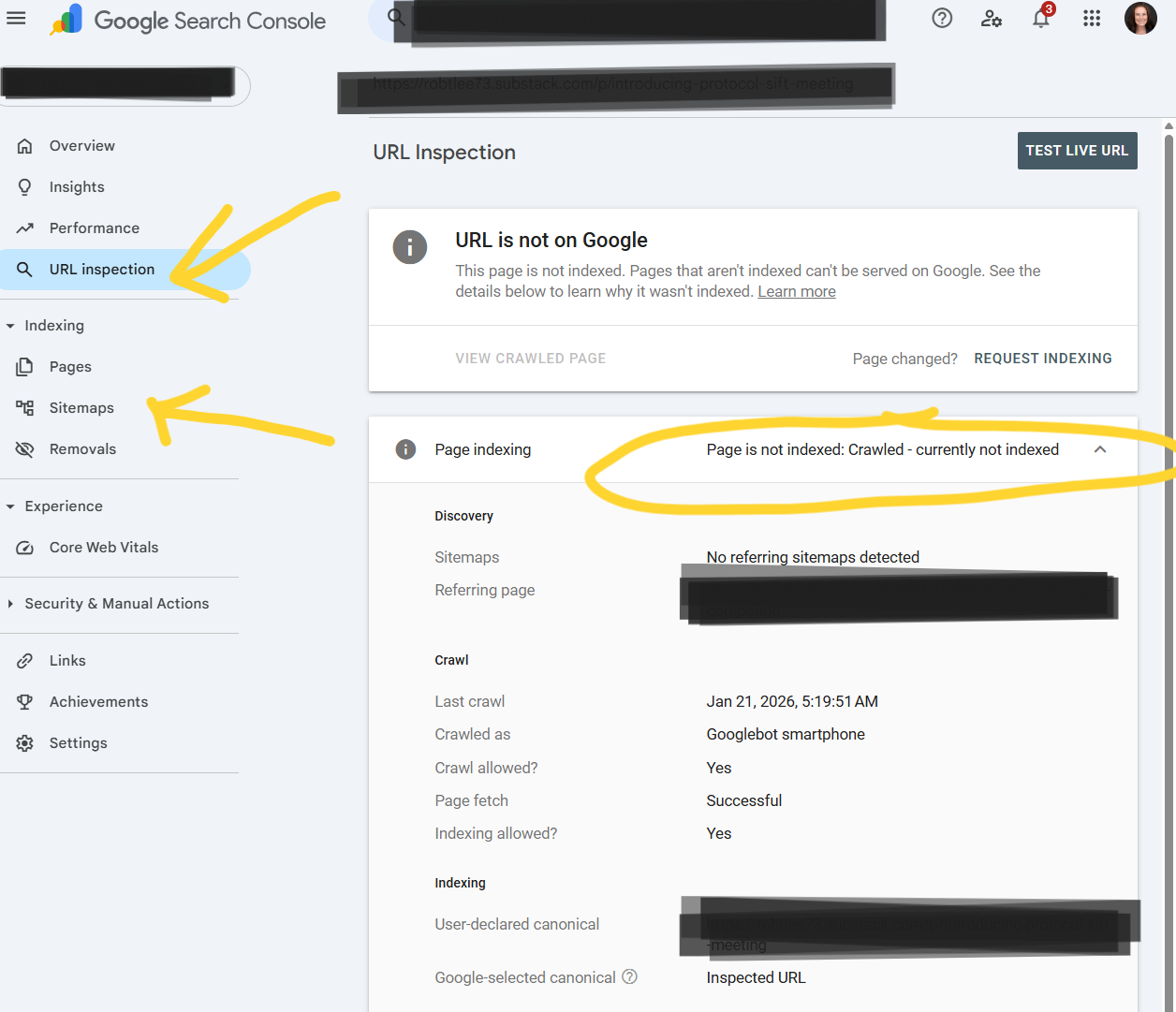
In Search Console, select Sitemaps from the left sidebar. You’ll see your substack mail url.
In the “Add a new sitemap” field, paste this: sitemap.xml
Click Submit.
3. Force-Index a Priority Post
For any specific top post you’d want to be found for first, (in my case I chose this one here) you don’t have to wait for Google’s schedule to naturally find that post.
Copy the URL: https://juliemichellemorris.substack.com/p/your-personal-positioning-thought.
Open Google Search Console
On the right side bar, click Inspect URL
Paste that link into the search bar at the very top of Search Console.
Click Request Indexing. This forces a crawler to visit this specific post immediately, signaling that this is the primary source of your thought leadership content.
The Performance Tab
You Performance tab (third tab on the left side of your Google Search Console home page) is a great place to keep you informed on how people are finding you through the search engine.
You can also see your queries list. This will show you what people are Googling to get them to your post.
For example, you might think you’re writing about “Personal Positioning,” but Google shows people are finding you for “AI Career Tips.” Now you know exactly what your next post should be titled to get more clicks.
Think of Substack as your private journal and Google Search Console as your public megaphone. It is the only way to tell Google, “Hey, I just wrote something important. Go show it to people.”
What happens if your subscriber list is small - under 500 Substack subscribers?
Substack will not give you access to plug in Google Search Console connection to your Substack - meaning, you can’t ask Google to rank your content.
Unfortunately, if you do not see the option, then there is no direct fix for this, except to try to expand your audience.
SEO is important, but it’s not the only way to expand your visibility.
How To Grow Your Email List
Scour your calendar, your LinkedIn connections, your contacts. Invite them to subscribe.
It will be uncomfortable, yes, but if your writing will serve, accept the discomfort and DO.
And if Substack won’t make that happen for you, I want to encourage you to try to build up your audience on your own.
Great news - someone shared that even with 100 subscribers this functionality in Substack was there - and it may be due to their faithful writing on Substack. One way or another - by writing or by growing your list, both being SO helpful - you’ll win.
So helpful!!! Followed these easy directions - thank you Julie!